
How to Jailbreak TV Firestick – UK Step-by-Step Guide
So, you want to get more out of your TV Firestick? You might have heard friends talk about “jailbreaking” it. This guide will explain everything in a simple way. Jailbreaking a Firestick means giving it permission to install apps from places other than the official Amazon App Store. It’s like being allowed to shop at more than one supermarket.

With over a decade of experience in streaming technology, IPTV apps, and Amazon Fire TV devices, James specializes in Firestick jailbreaking, app installation, and cord-cutting solutions for users in the UK.
 Add as a preferred source on Google
Fire tv stick Lifetime Subscription
Ready to unlock the true potential of your fire tv stick without the risk and constant maintenance?
Get Fire tv stick LifeTime
This is very popular in the UK. People do it to watch different types of videos and use apps that Amazon doesn’t offer. It makes your Firestick more flexible and fun to use.
Please don’t worry. This guide only shows you safe and legal methods. The key rule is simple: you must never use jailbroken apps to watch copyrighted movies or shows without paying. That is stealing. As long as you follow that rule, you’re doing everything right.
In this article, you will learn exactly what jailbreaking means. We will explain the legal side of things in the UK. Then, we will walk you through the jailbreaking process step-by-step. We will also suggest some great apps to try and share important safety tips. Let’s begin!
Must-Do Steps Before You Jailbreak Firestick
Before you Jailbreak Firestick, complete these 3 safety checks:
- Enable Unknown Sources
- Go to: Settings > My Fire TV > Developer Options
- Turn ON “Apps from Unknown Sources”
Go into Settings Option

Then Click on Developer Options

Then Click on install unknown Apps

Turn ON “Apps from Unknown Sources”

Click your device name 7 times

Step 1: Install Downloader App from Amazon Store
First, you need the Downloader app to jailbreak Firestick. This app lets you download the jailbreak tools. Here’s how to get it:
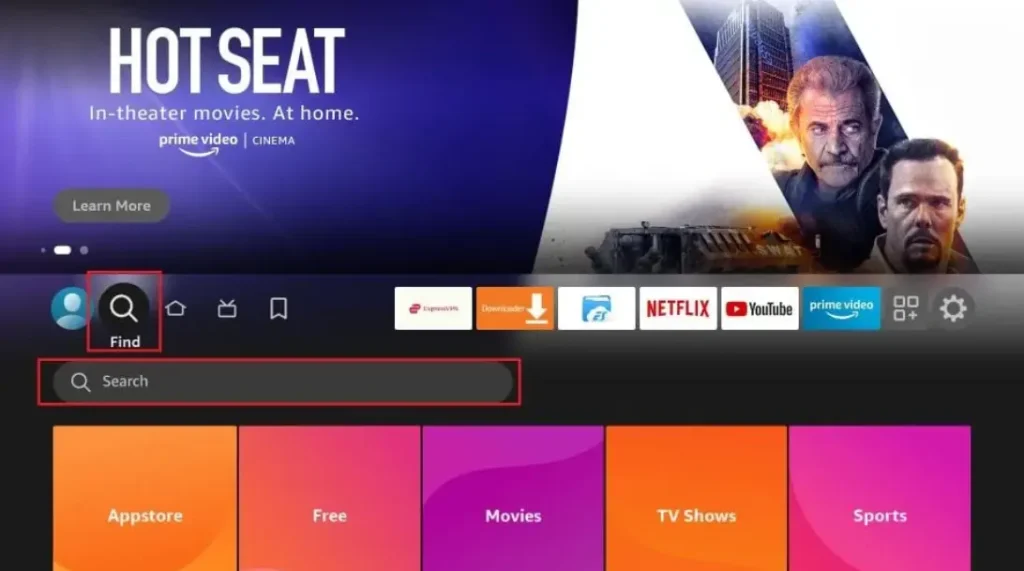
- Turn on your Firestick and go to the home screen
- Click the search icon (magnifying glass) at the top
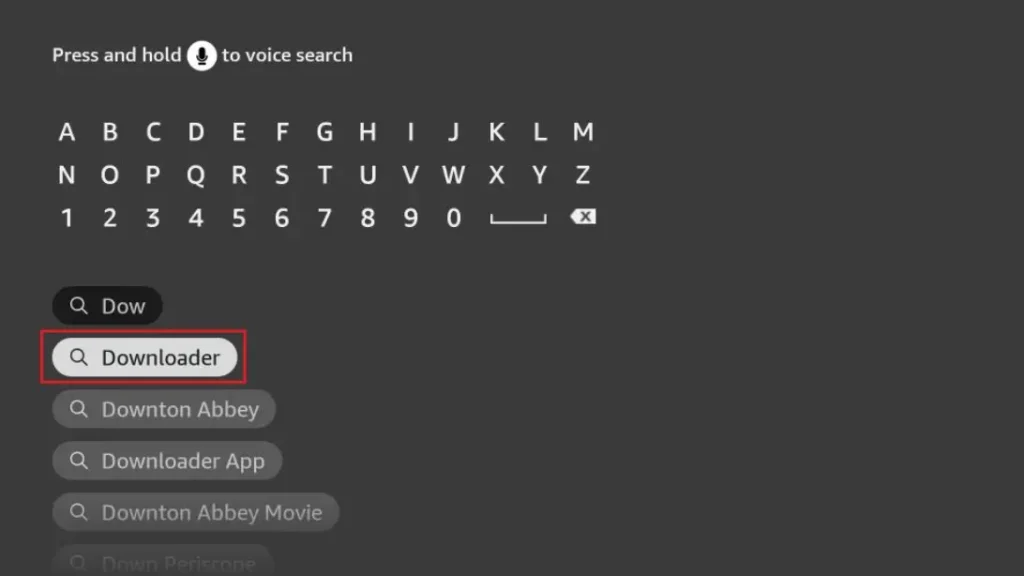
- Type “Downloader” and select the orange app icon
- Click “Download” and wait for installation
- Open the app when it’s ready
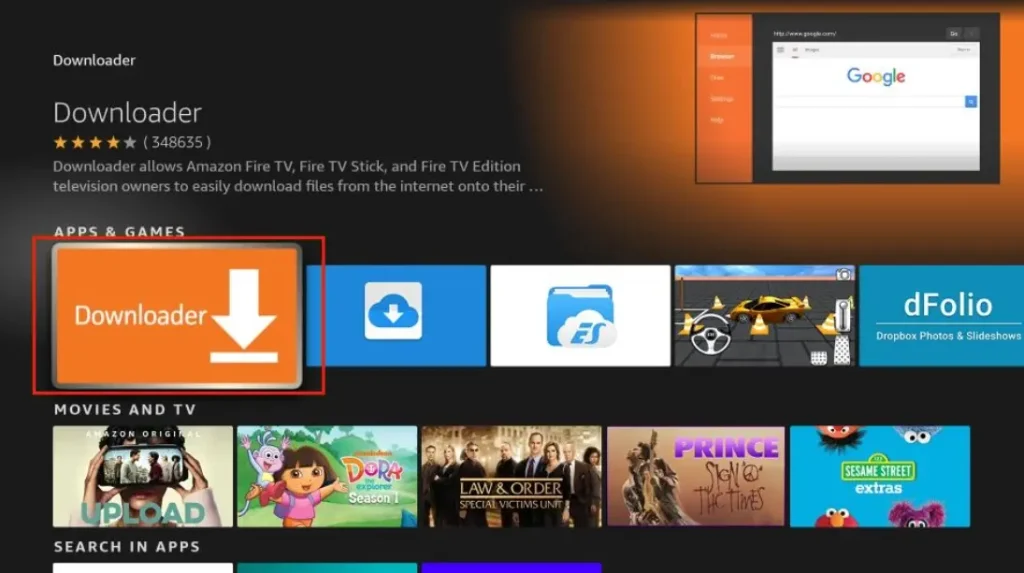
The Downloader app is free and safe. It’s the first tool you need to jailbreak Firestick. Without it, you can’t get the other apps that make jailbreaking work.
Step 2: Enter URL to Download Jailbreak Tool
Now that you have Downloader, you can get the jailbreak tools:
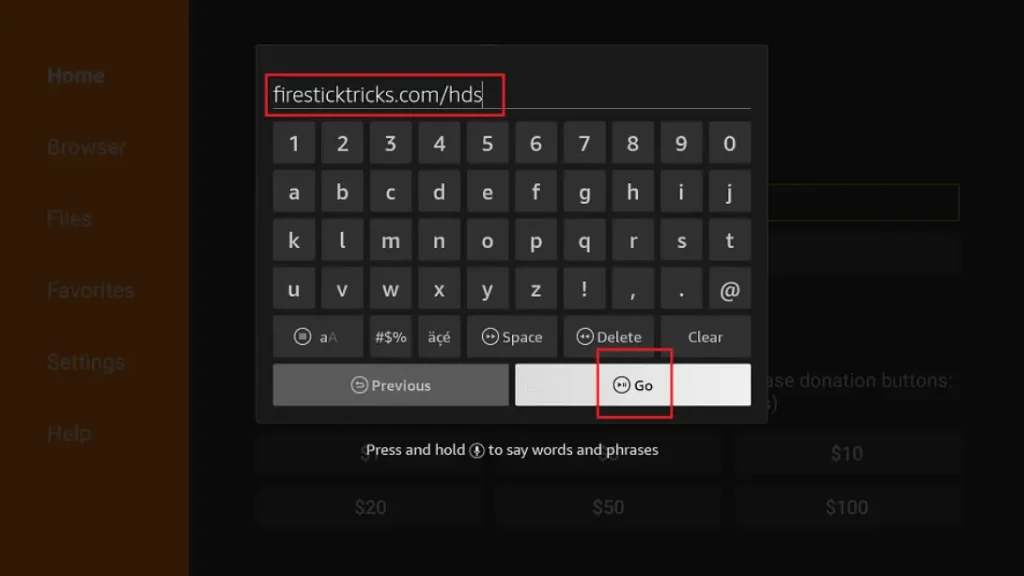
- Open Downloader app
- In the URL box, type: troypoint.com/fire (this is safe)
- Click “Go” and wait for the page to load
- Follow the on-screen instructions to download
- The installer will appear – click “Install”
What is Jailbreaking a TV Firestick?
A Simple Definition
The word “jailbreak” might sound scary, but it’s not. For a TV Firestick, jailbreaking just means enabling third-party apps. Third-party apps are programs made by companies other than Amazon. Normally, your Firestick only lets you install apps from the Amazon App Store. Jailbreaking changes that one setting.
This is very different from jailbreaking a phone. You are not hacking into the system. You are not breaking any locks. You are simply switching on a feature that Amazon already built into the device. It does not void your warranty.
How It Works and What It Isn’t
The main step is finding a setting called “Apps from Unknown Sources.” You turn this setting from OFF to ON. Once it’s on, you can install apps from the internet using a tool like the Downloader app.
Let’s clear up two big misconceptions. First, jailbreaking does not modify the Amazon operating system (OS). The Firestick’s own software stays completely untouched. Second, it is fully reversible. If you change your mind, you can just turn the setting off again or reset the device. Your Firestick will go right back to normal.
Is Jailbreaking a Firestick Legal in the UK?
The Legal Part is Clear
In the United Kingdom, the act of jailbreaking your own Firestick is 100% legal. The law says you can modify the software on devices you own. Changing the “Unknown Sources” setting is your right. Installing third-party apps from the internet is also allowed.
However, a very important line exists. Using those apps to watch pirated content is illegal. Pirated content is movies, sports, or TV shows shared online without permission from the people who made them. UK copyright law protects creators. Streaming their work for free from illegal websites breaks that law.
Your Choices Matter
Think about the difference between a tool and how you use it. Installing a new app is like buying a tool from a shop. Using that app to stream stolen movies is like using the tool to break into a house. One is fine, the other is a crime.
The responsibility always lies with you, the user. This guide encourages you to only use safe, legal apps and streaming services. Many fantastic legal apps let you watch free movies, listen to music, or manage your photos. You can enjoy all the benefits of a jailbroken Firestick without ever doing anything illegal.
What You Need Before Jailbreaking a TV Firestick
Getting ready is easy! First, you need a compatible Amazon Fire TV Stick. Most models work, like the Firestick Lite, the 4K version, or the 4K Max. You also need a TV with a free HDMI port to plug it into.
A stable internet connection is very important for downloading apps. Make sure you are logged into your Amazon account on the Firestick. Finally, keep your Firestick remote handy. With these five things, you’re all set to start!
Step-by-Step Guide to Jailbreak a TV Firestick
Step 1: Go to Firestick Settings
Turn on your TV and Firestick. You will see the main home screen. Using your remote, move to the top menu. Look for the Settings option. It often looks like a little gear icon. Click on it to open your Firestick’s Settings menu.
Step 2: Enable Developer Options
Inside Settings, scroll to the right. Find and select the option called “My Fire TV.” On the next screen, choose “About.” Now, here comes the magic trick. On the “About” screen, highlight the line that says “Fire TV Stick.” Quickly press the center button on your remote seven times. A message will pop up saying, “You are now a developer!” A new menu will appear.
Step 3: Turn on Apps from Unknown Sources
Press the back button on your remote to go to the previous “My Fire TV” menu. You will now see a new option called “Developer Options.” Open it. Inside, find the setting named “Apps from Unknown Sources.” It will be switched OFF. Select it to turn it ON. A warning will appear. Read it and select “Turn On.” This is the main jailbreaking step!
Step 4: Install the Downloader App
Go back to your home screen. Find the search icon (it looks like a magnifying glass). Search for the word “Downloader.” From the results, choose the official Downloader app. Click “Download” or “Get” to install it. Once installed, open the app. It may ask for permission to access files – say yes.
Step 5: Download Third-Party Apps via Downloader
The Downloader app has a blank box to type in a web address (URL). You must type the exact URL for a trusted app website. For example, a website for a legal file manager. Type the address carefully and press “Go.” The app file (called an APK) will download. The Downloader will then ask if you want to install it. Click “Install.” After installation, click “Open” or “Done.” Finally, always delete the APK file when asked to save space. Only use URLs from websites you trust completely.
Best UK-Friendly Apps to Install After Jailbreaking
Great Apps to Explore
Now for the fun part—finding new apps! Some popular legal categories include media players like Kodi (when used with legal add-ons) or Plex. These help you organize and play your own video collection. File manager apps let you see and sort files on a USB drive connected to your Firestick. You could even install a web browser to use the internet on your big TV. Utility apps can help clear cache or change your screen saver.
Smart Tips for Choosing Apps
Always look for apps from trusted sources. Good websites are often recommended in official forums or by reputable tech guides. You should avoid any app that aggressively promises free paid TV channels or new movie releases. These apps often promote illegal content and can be unsafe. Stick to apps that have a clear, legal purpose like playing local files or accessing free, public streaming services.
Benefits of Jailbreaking a Firestick
Jailbreaking opens up a world of new possibilities. The biggest benefit is access to more apps and streaming services. You are no longer limited to what Amazon chooses to sell. This gives you full control over your Firestick. You can decide exactly what is on your home screen.
You get better customization options for how your device looks and works. Some people find they can save money by using free, legal streaming apps instead of multiple subscriptions. For UK viewers, this flexibility is great. You can tailor your Firestick to watch content from all over the world.
Risks and How to Stay Safe
Understanding Possible Risks
Being aware of risks helps you avoid them. The main risk is installing malicious apps from bad websites. These apps might show too many ads, try to steal your information, or contain viruses. Some poorly made apps can slow your Firestick down or make it crash. There can also be privacy issues if an app collects your data without you knowing.
Easy Safety Tips
Staying safe is straightforward. First, only use reputable apps from well-known sources. Second, keep your Fire OS updated. Updates often fix security holes. Go to Settings > My Fire TV > About > Check for Updates. Third, delete unused apps to keep your device running fast. Finally, avoid clicking on unknown pop-up ads or links inside apps. If a pop-up looks suspicious, just close it.
Can Amazon Block or Ban a Jailbroken Firestick?
This is a common worry, but the answer is reassuring. Amazon generally does not block or ban devices just for enabling “Unknown Sources.” They put that setting there for a reason. Your device’s warranty usually remains intact after this change.
Problems only arise if you use your Firestick for clearly illegal activity. This could mean using apps designed solely for piracy or fraud. If you use your jailbroken Firestick responsibly with legal apps, Amazon will not take any action against your device.
How to Un-Jailbreak or Reset Firestick
If you want to return your Firestick to its original state, it’s very easy. The simplest way is a factory reset. Go to Settings > My Fire TV > Reset to Factory Defaults. Confirm your choice. Your Firestick will erase all your installed apps, settings, and data. It will reboot and look exactly like it did when you first bought it. The “Unknown Sources” setting will be turned off. Your Firestick is now completely un-jailbroken.
Frequently Asked Questions (FAQ)
Is jailbreaking Firestick free in the UK?
Yes, it is completely free. You never need to pay for software or a service to do it.
Will it slow down my Firestick?
The jailbreak itself won’t. But if you install too many apps or a badly coded app, it can use up memory and make the Firestick feel slower.
Can I jailbreak without Downloader?
Yes, there are other installer apps, but Downloader is the most popular and easiest for beginners to use.
Does it void warranty?
No, simply enabling ‘Unknown Sources’ does not void your warranty in the UK.
Is it safe for beginners?
Yes, if you carefully follow a trusted step-by-step guide like this one. Take it slow and double-check each step.
Conclusion
Jailbreaking your TV Firestick is a simple process that gives you more freedom. We have walked through what it means, confirmed it’s legal in the UK, and shown you each step. Remember, your safety depends on using legal apps and content.
We encourage you to explore your device responsibly and have fun with all the new options. If you enjoyed this guide, feel free to explore our website for more helpful Firestick tips and tutorials. Happy streaming
Is Jailbreaking a Firestick Legal in the UK?
Many people in the UK ask whether jailbreaking a Firestick is legal or not. The short answer is: jailbreaking a Firestick itself is legal in the UK, but how you use it matters a lot.
When you jailbreak Firestick, you are only changing the device settings to allow third-party apps. This process does not break UK law on its own. Amazon Firestick devices are owned by the user, so changing settings for personal use is allowed.
However, problems start when a jailbroken device is used to watch paid TV channels, Sky content, movies, or sports for free without permission. This is illegal in the UK and goes against copyright laws. The law focuses more on what you watch, not just the jailbreaking step.
If you want a safe and detailed explanation, visit this guide on jailbreak firestick to understand what is allowed and what is risky. Many UK users jailbreak Firestick to install legal apps like Kodi for free content.
To stay on the safe side, always use legal apps and services after jailbreak firestick. For updated UK rules and beginner tips, this jailbreak firestick guide is a helpful resource.
Related Post:
- Unlock Endless Entertainment: A Complete Guide to Jailbreaking Sky Glass on Your Firestick in the UK
- Unlock Your Firestick: The Truth About Sky Glass Jailbreak APKs for UK Viewers
- Jailbreak Sky Glass on Firestick: The Ultimate UK Guide to Unlocking Your TV in 2025
- Sky Glass Jailbreak Firestick APK Latest Version: A UK User’s 2025 Guide to Safe & Informed Streaming
- Jailbreak Sky Glass on Firestick Free Download: The Ultimate 2024 Guide for UK Streamers