
How to Jailbreak a Fire TV in the UK – Step-by-Step Guide
Do you have an Amazon Fire TV or a little Fire TV Stick plugged into your television? Lots of people in the UK do. It is a popular way to watch Netflix, Disney+, and catch-up TV. But you might hear the word “jailbreak” and wonder what it means.
“Jailbreaking” sounds like you are breaking out of prison, but it is not that dramatic for your Fire TV. It does not mean you are hacking it or doing something naughty. Think of your Fire TV like a playground that only has swings. Jailbreaking is like getting the key to the whole park, where you can also use the slide and the climbing frame that were already there. You are simply unlocking features that Amazon already built into your device but keeps hidden.

With over a decade of experience in streaming technology, IPTV apps, and Amazon Fire TV devices, James specializes in Firestick jailbreaking, app installation, and cord-cutting solutions for users in the UK.
 Add as a preferred source on Google
Fire tv stick Lifetime Subscription
Ready to unlock the true potential of your fire tv stick without the risk and constant maintenance?
Get Fire tv stick LifeTime
People in the UK often want to know how to jailbreak a fire tv because they want more choices. Maybe they want a cool new app that is not in the official Amazon store. This guide will explain everything in simple language. We will show you how it works, why people do it, and how to stay safe and legal while using your device in the UK.
Must-DoBefore You Jailbreak Firestick
Before you Jailbreak Firestick, complete these 3 safety checks:
- Enable Unknown Sources
- Go to: Settings > My Fire TV > Developer Options
- Turn ON “Apps from Unknown Sources”
Go into Settings Option

Then Click on Developer Options

Then Click on install unknown Apps

Turn ON “Apps from Unknown Sources”

Click your device name 7 times

Step 1: Install Downloader App from Amazon Store
First, you need the Downloader app to jailbreak Firestick. This app lets you download the jailbreak tools. Here’s how to get it:
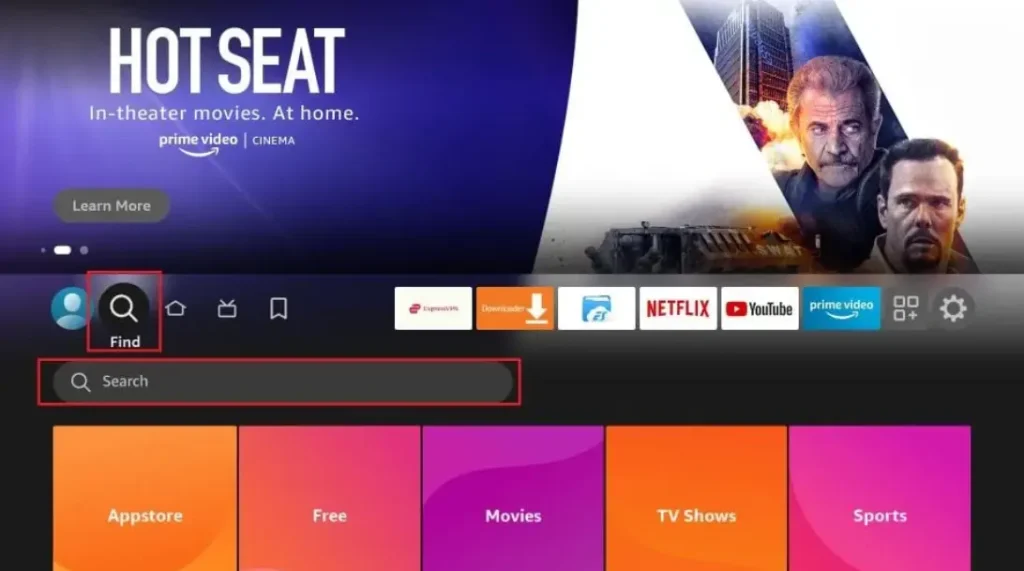
- Turn on your Firestick and go to the home screen
- Click the search icon (magnifying glass) at the top
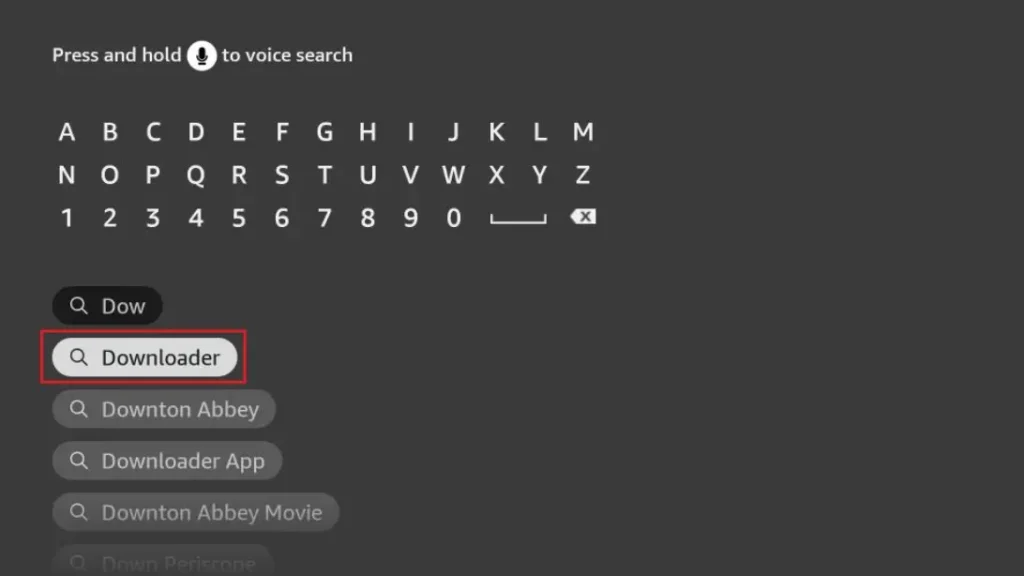
- Type “Downloader” and select the orange app icon
- Click “Download” and wait for installation
- Open the app when it’s ready
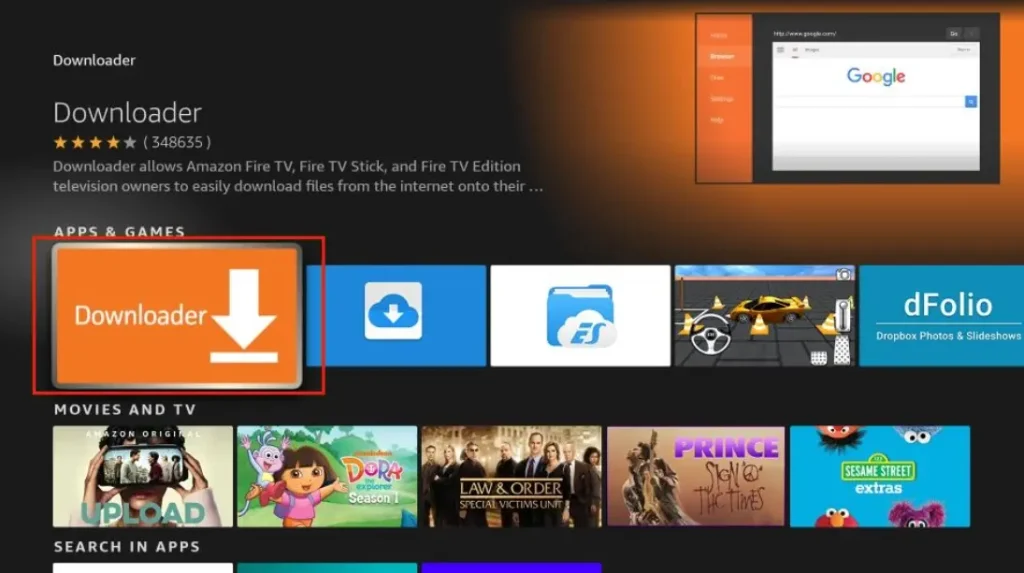
The Downloader app is free and safe. It’s the first tool you need to jailbreak Firestick. Without it, you can’t get the other apps that make jailbreaking work.
Step 2: Enter URL to Download Jailbreak Tool
Now that you have Downloader, you can get the jailbreak tools:
- Open Downloader app
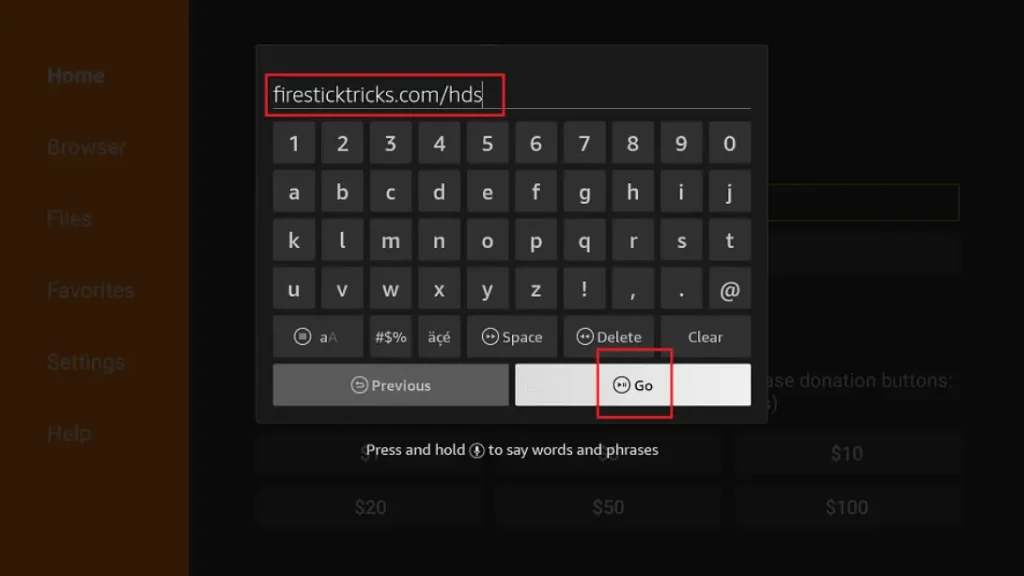
- In the URL box, type: troypoint.com/fire (this is safe)
- Click “Go” and wait for the page to load
- Follow the on-screen instructions to download
- The installer will appear – click “Install”
Is Jailbreaking a Fire TV Legal in the UK?
This is the most important question. Let us make UK law simple to understand.
In the United Kingdom, the act of jailbreaking your own Fire TV is usually legal. This means you can change the settings on a gadget you own. It is like putting new software on a laptop you bought. You are just using options that Amazon built into the device.
But you must know a very big difference:
Jailbreaking (unlocking your device) is NOT the same as piracy (stealing movies and shows).
What is LEGAL in the UK:
- Installing third-party apps. This means adding new, safe apps from other places.
- Using VPNs. A VPN is a privacy tool. Using one to stay safe online is fine.
What is ILLEGAL in the UK:
- Streaming copyrighted content without permission. This means watching new films, live football, or premium TV for free on illegal websites or apps. This steals from the people who made the shows and breaks the law.
Amazon’s own rules might say they do not like you installing other apps. But UK law about your own property is different. This guide gives you information, but you must promise to use your device in a responsible and legal way.
Benefits of Jailbreaking a Fire TV
So, why would you want to jailbreak your Fire TV? Here are the good things it lets you do.
The biggest benefit is access to more apps. The official Amazon App Store does not have every app in the world. Jailbreaking lets you install amazing apps it does not have. You also get more customisation and flexibility. You can change how things look and work to suit you better.
You can get an improved streaming experience. Some apps let you organise all your streaming services in one place. Others are fantastic media players that can show more types of video files. Better file management is another plus. You can add apps that help you organise videos and photos on a USB stick.
These benefits really appeal to UK cord-cutters. That is just a fancy word for people who stop paying for expensive satellite TV and use the internet to watch things instead. Jailbreaking helps them build their own perfect TV system.
What You Need Before You Jailbreak a Fire TV
Getting ready is easy. You only need a few things.
First, you need a supported Fire TV device. Most models work perfectly. This includes the Fire TV Stick Lite, the Fire TV Stick 4K, the Fire TV Stick 4K Max, and the Fire TV Cube. Check which one you have by looking at the settings menu.
You will need a stable internet connection. Use your normal UK home broadband Wi-Fi. A good signal helps apps download fast. You also must be logged into your Amazon account on the device.
Some things are optional but recommended. A VPN is a smart tool for online privacy and can help with internet speed. The Downloader app is a free tool you will need to install other apps. Finally, check you have a little storage space free and that your Fire TV software is up to date. You do this in the settings menu.
Step-by-Step Guide: How to Jailbreak a Fire TV (Main Section)
Let us walk through the main steps. Remember, this is not hacking; it is just unlocking settings.
🔹 Step 1: Enable Developer Options on Fire TV
This is the key step. You are turning on a secret menu.
First, go to Settings on your Fire TV home screen. From there, select My Fire TV (it might say Device & Software). Next, click on About. On this screen, you will see an option called Fire TV version or your device name. You need to click on this seven times quickly. A message will pop up saying “You are now a developer!”
Now, go back. You will see a brand new menu called Developer Options. Open it. Inside, you need to Turn ON two important switches. Find Apps from Unknown Sources and switch it ON. Also, find ADB Debugging and switch that ON too. This gives your device the permission it needs.
🔹 Step 2: Install Downloader App
Now you need a tool to bring new apps to your Fire TV.
Go back to your main screen and open the Amazon App Store. Use the search box and type in “Downloader”. Find the app and install it. It is free. Open the Downloader app once it installs. It will ask for some permissions, like access to your storage. Click “Allow” so it can work properly.
The Downloader is essential for jailbreaking because it acts like a special web browser. It lets you safely download the installation files (called APKs) for the new apps you want.
🔹 Step 3: Install Third-Party Apps (APK Files)
This is where you get your exciting new apps. An APK file is just the installation package for an app.
Inside the Downloader app, you type a web address to download an APK from a safe, trusted source. We will not give specific links, but you should only use websites that tech experts recommend. Never download from a random, strange-looking site.
For UK security tips, always think before you click. If a website has lots of flashy ads or asks you to download other weird software, close it. Also, remember your Fire TV has limited storage, so do not install fifty apps at once!
🔹 Step 4: Confirm Fire TV Is Jailbroken
How do you know you did it right? Let’s check.
Signs your jailbreak was successful are easy to spot. You can open and use the new apps you installed! Try opening one. If it works, congratulations! You can also go to Settings > Applications > Manage Installed Applications to see all your new apps listed there.
If you get a common error, like an app crashing, try uninstalling it and downloading the APK file again. Make sure you followed Step 1 correctly and turned ON “Apps from Unknown Sources.”
Best Apps to Install After Jailbreaking Fire TV (UK Users)
Now for the fun part! Here are some great types of legal apps you can add.
You can install advanced media players. Apps like VLC can play almost any video file from a USB stick. File manager apps are super useful. They help you organise, copy, and delete files on your device. Look for utility & maintenance apps too. These can help keep your Fire TV running smoothly.
You can also find legal streaming apps for content you are allowed to watch. This might include official apps for TV channels from other countries. Remember, always choose safe apps. Avoid apps that promise free, brand-new cinema movies or live pay-per-view sports. These are nearly always illegal and unsafe.
Do You Need a VPN for a Jailbroken Fire TV in the UK?
You will see many people talking about VPNs. Let us explain what they are and why.
A VPN (Virtual Private Network) is like an invisible cloak for your internet connection. It hides your online activity. In the UK, people use them for two main reasons. The first is privacy, so your internet provider (ISP) cannot easily see everything you do. The second is to prevent ISP throttling. This is when your internet speed gets slowed down if you stream lots of video.
The privacy benefits are a big plus. A VPN adds an extra layer of security, especially on any device. A VPN is recommended if you want more privacy online. But remember the most important rule: a VPN is just a privacy tool. It does not make illegal streaming legal. You should always stream content you have permission to watch.
Common Problems & Fixes When Jailbreaking Fire TV
Do not worry if something goes wrong. Most problems are easy to fix.
If the Developer options menu is missing, go back to Settings > My Fire TV > About and click on your device name seven times again. If the Downloader app is not working, check your Wi-Fi connection and make sure you installed it from the official Amazon store.
If you see “APK install failed”, double-check that “Apps from Unknown Sources” is definitely turned ON in Developer Options. Low storage issues mean you need to delete some old apps or files you do not use. If your Fire TV is running slow after adding lots of apps, try restarting it by unplugging the power for 30 seconds.
How to Un-Jailbreak or Reset a Fire TV
You can always change your mind and go back to normal. It is simple.
The full method is a factory reset. Go to Settings > My Fire TV > Reset to Factory Defaults. This will erase everything – all your logins, settings, and new apps. Your Fire TV will be like new again.
You can also try just removing third-party apps one by one in the settings menu. Restoring default Fire TV settings means going back into Developer Options and turning OFF “Unknown Sources” and “ADB Debugging”. Resetting is useful if you are giving the device to someone else or if it has a big problem you cannot fix.
FAQs About Jailbreaking a Fire TV (Schema-Ready)
Here are quick answers to questions people ask all the time.
How to jailbreak a Fire TV safely?
Follow a clear guide from a website you trust. Only install apps from sources that experts say are safe. Never add apps that promise stolen movies.
Is jailbreaking Fire TV legal in the UK?
Yes, changing settings on your own device is legal. Using it to watch copyrighted material without paying is illegal.
Can jailbreaking damage a Fire TV?
No, not if you follow the steps. You are just changing software options. A factory reset can always fix it if you change your mind.
Does jailbreaking void the warranty?
It can. If your device breaks and Amazon finds out a third-party app caused it, they might not fix it for free. Doing a factory reset before you contact them can sometimes help.
Can Amazon block a jailbroken Fire TV?
They do not usually try to find them. Your device will keep working. They just might not help you if a problem is caused by an app you installed yourself.
Final Verdict: Should You Jailbreak a Fire TV in the UK?
So, should you do it? Let us think about what we learned.
Jailbreaking is great for you if: You like trying new technology. You want to use legal apps that are not on the Amazon store. You enjoy having more control and customisation over your gadgets.
You should avoid jailbreaking if: You only use a couple of big apps like BBC iPlayer and are happy. You do not like following technical steps. You think it is a way to get everything for free (it is not, and that is stealing).
In the end, the choice is yours. This guide gives you the knowledge to make a smart choice. Always remember to use your device in a safe and legal way. Have fun exploring!
Is Jailbreaking a Firestick Legal in the UK?
Many people in the UK ask whether jailbreaking a Firestick is legal or not. The short answer is: jailbreaking a Firestick itself is legal in the UK, but how you use it matters a lot.
When you jailbreak Firestick, you are only changing the device settings to allow third-party apps. This process does not break UK law on its own. Amazon Firestick devices are owned by the user, so changing settings for personal use is allowed.
However, problems start when a jailbroken device is used to watch paid TV channels, Sky content, movies, or sports for free without permission. This is illegal in the UK and goes against copyright laws. The law focuses more on what you watch, not just the jailbreaking step.
If you want a safe and detailed explanation, visit this guide on jailbreak firestick to understand what is allowed and what is risky. Many UK users jailbreak Firestick to install legal apps like Kodi for free content.
To stay on the safe side, always use legal apps and services after jailbreak firestick. For updated UK rules and beginner tips, this jailbreak firestick guide is a helpful resource.
Related Post:
- Unlock Endless Entertainment: A Complete Guide to Jailbreaking Sky Glass on Your Firestick in the UK
- Unlock Your Firestick: The Truth About Sky Glass Jailbreak APKs for UK Viewers
- Jailbreak Sky Glass on Firestick: The Ultimate UK Guide to Unlocking Your TV in 2025
- Sky Glass Jailbreak Firestick APK Latest Version: A UK User’s 2025 Guide to Safe & Informed Streaming
- Jailbreak Sky Glass on Firestick Free Download: The Ultimate 2024 Guide for UK Streamers