
How Do You Jailbreak Fire TV Stick – UK Step-by-Step Guide
Do you want your Fire TV Stick to do more exciting things? You might have heard about “jailbreaking.” This guide will explain everything in simple words. Jailbreaking a Fire TV Stick means allowing it to install apps from places other than the official Amazon App Store. It’s like getting a special key to a bigger toy box.
This is very popular in the UK. People enjoy the freedom to choose different apps for streaming videos, playing music, and more. It makes your little device much more powerful.

With over a decade of experience in streaming technology, IPTV apps, and Amazon Fire TV devices, James specializes in Firestick jailbreaking, app installation, and cord-cutting solutions for users in the UK.
 Add as a preferred source on Google
Fire tv stick Lifetime Subscription
Ready to unlock the true potential of your fire tv stick without the risk and constant maintenance?
Get Fire tv stick LifeTime
This guide only shows you safe and legal methods. The most important rule is this: you must never use jailbroken apps to watch movies or shows you didn’t pay for. That is against the law. As long as you follow that rule, you are doing everything right.
In this article, you will learn what jailbreaking really means. We will talk about the legal side of things in the UK. We will then walk you through the jailbreaking process, one easy step at a time. We will also suggest some great apps to try and share important safety tips. Let’s begin!
Must-Do Steps Before You Jailbreak Firestick
Before you Jailbreak Firestick, complete these 3 safety checks:
- Enable Unknown Sources
- Go to: Settings > My Fire TV > Developer Options
- Turn ON “Apps from Unknown Sources”
Go into Settings Option

Then Click on Developer Options

Then Click on install unknown Apps

Turn ON “Apps from Unknown Sources”

Click your device name 7 times

Step 1: Install Downloader App from Amazon Store
First, you need the Downloader app to jailbreak Firestick. This app lets you download the jailbreak tools. Here’s how to get it:
- Turn on your Firestick and go to the home screen
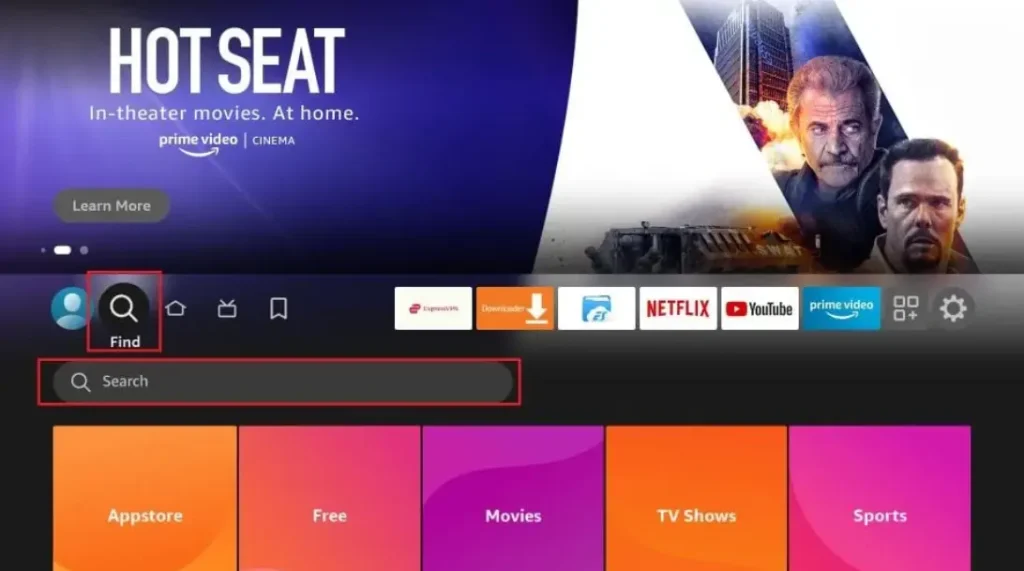
- Click the search icon (magnifying glass) at the top
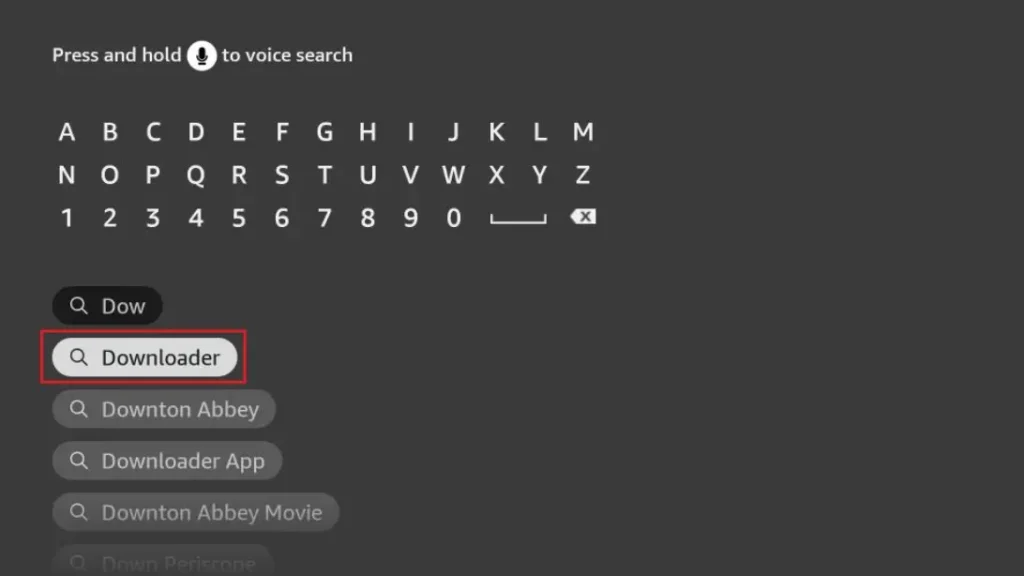
- Type “Downloader” and select the orange app icon
- Click “Download” and wait for installation
- Open the app when it’s ready
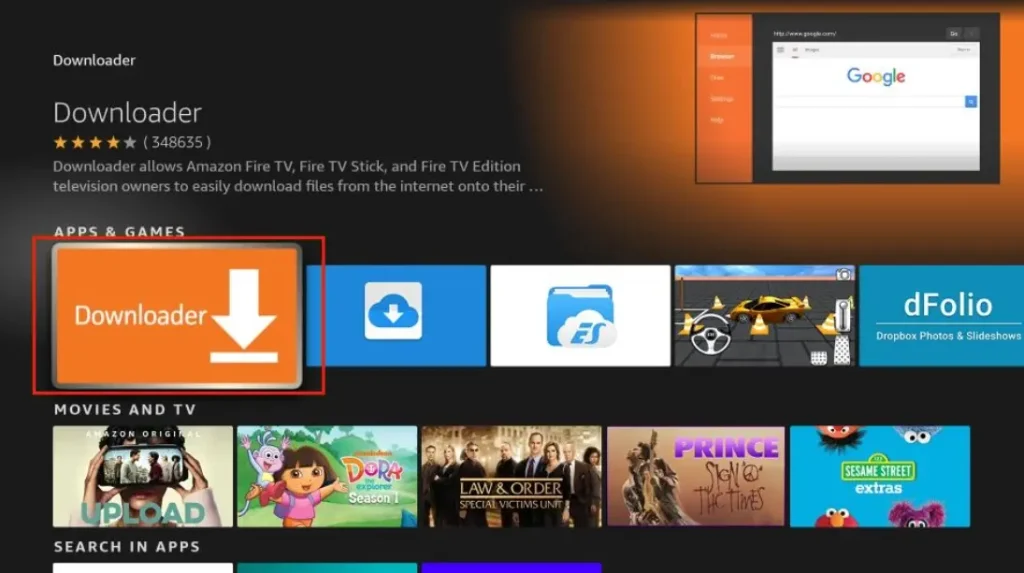
The Downloader app is free and safe. It’s the first tool you need to jailbreak Firestick. Without it, you can’t get the other apps that make jailbreaking work.
Step 2: Enter URL to Download Jailbreak Tool
Now that you have Downloader, you can get the jailbreak tools:
- Open Downloader app
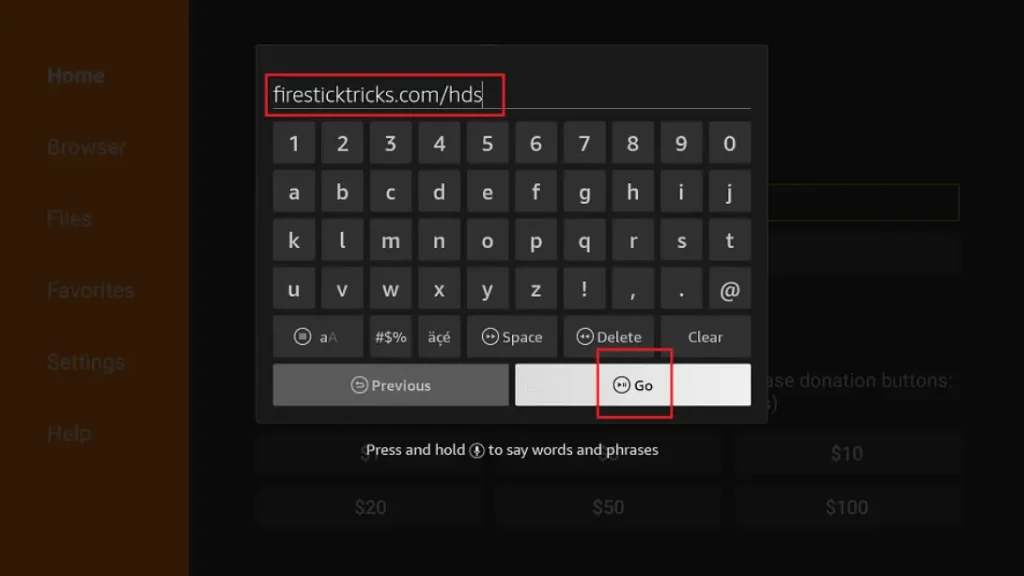
- In the URL box, type: troypoint.com/fire (this is safe)
- Click “Go” and wait for the page to load
- Follow the on-screen instructions to download
- The installer will appear – click “Install”
What Does Jailbreaking a Fire TV Stick Mean?
The Easy Explanation
The word “jailbreak” sounds like an escape, but it’s much simpler. For your Fire TV Stick, jailbreaking just means enabling the installation of third-party apps. Third-party apps are programs made by other companies, not Amazon. Your Firestick normally only lets you install apps from its own store. Jailbreaking changes one setting to open the door to more options.
This is different from jailbreaking a phone. You are not hacking the device. You are not changing its brain. The Fire TV Stick already has this ability inside it. Amazon just keeps the door locked by default. You are simply finding the key and turning it.
How It Works and What It Is Not
You find a special setting called “Apps from Unknown Sources.” You change this setting from OFF to ON. Once it’s on, you can use a tool like the “Downloader” app to bring new apps onto your device from the internet.
Let’s clear up two big ideas. First, jailbreaking is fully reversible. If you don’t like it, you can turn the setting off again. You can even reset the whole device. It will go back to exactly how it was before. Second, it does not void your warranty. Changing this setting does not break any promise you made to Amazon. Your device’s warranty stays safe.
Is Jailbreaking a Fire TV Stick Legal in the UK?
The Law Says Yes
Here is the clear answer: In the United Kingdom, jailbreaking your own Fire TV Stick is legal. You bought the device. You own it. The law says you can change its software settings. Turning on “Apps from Unknown Sources” is your right.
But there is a very important line you must not cross. Watching pirated content is illegal. Pirated content means movies, sports, or TV shows shared online without permission from the people who made them. UK copyright law protects these creators. Streaming their work for free from illegal websites breaks that law.
Your Choices Matter
Think of it like a car. Buying and modifying your car is legal. Using your modified car to break the speed limit is not legal. Your jailbroken Firestick is the car. How you use it is your responsibility.
The responsibility always stays with you, the user. This guide asks you to only use legal apps and streaming services. Wonderful free apps exist for news, education, and entertainment. You can have lots of fun and explore new things without ever doing anything wrong.
Requirements Before Jailbreaking
Getting ready is quick! First, you need a compatible Fire TV Stick. Models like the Lite, the 4K, or the 4K Max all work. You also need a TV with an HDMI port to plug it into.
A stable internet connection is necessary to download apps. Make sure you are logged into your Amazon account on the device. Finally, keep your Fire TV remote close by. With these five simple things, you are all set to start.
Step-by-Step Guide to Jailbreak Fire TV Stick
Step 1: Go to Fire TV Stick Settings
Turn on your TV and Fire Stick. Look at the home screen. Use your remote to go to the top menu. Find the option called Settings. It usually looks like a little gear. Click on it to open the main Settings menu.
Step 2: Enable Developer Options
Inside Settings, scroll to the right. Find and select the option named “My Fire TV.” On the next screen, choose “About.” Now, here’s a cool trick. On the “About” screen, highlight the line that says “Fire TV Stick.” Quickly press the center button on your remote seven times. A message will pop up saying, “You are now a developer!” A new menu will appear.
Step 3: Turn on Apps from Unknown Sources
Press the back button to go to the previous “My Fire TV” menu. You will now see a new option called “Developer Options.” Open it. Inside, find the setting for “Apps from Unknown Sources.” It will be switched OFF. Select it to turn it ON. You will see a warning message. Read it and choose “Turn On.” This is the main step that jailbreaks your device.
Step 4: Install Downloader App
Go back to your home screen. Find the search icon (it looks like a magnifying glass). Search for the word “Downloader.” From the results, pick the official Downloader app. Click “Download” or “Get” to install it. Once it’s installed, open the app. It might ask for permission to access files – say yes.
Step 5: Download Third-Party Apps via Downloader
Inside the Downloader app, you will see a box to type a website address (URL). You need to type the exact URL for a trusted app website. For example, a website for a fun, legal game. Type the address carefully and press “Go.” The app file (called an APK) will download. The Downloader will then ask if you want to install it. Click “Install.” After installation, you can open your new app. Always choose to delete the APK file when asked. This saves space. Remember: only use website addresses from sources you really trust.
Best Apps for a Jailbroken Fire TV Stick
Fun and Useful Apps
Now for the exciting part—finding new apps! Good categories to explore include media players like Kodi or Plex. When used properly, these can play videos from your own computer. File manager apps help you organize your photos and documents on a USB stick. A web browser lets you visit your favourite websites on the big TV screen. Utility apps can help your device run faster or look cooler.
Choosing the Right Apps
Picking apps safely is very important. Always use reputable sources. Look for apps talked about on well-known technology news sites. You should avoid apps that promote illegal content. These apps often have names or descriptions promising free new movies or paid sports channels. They are usually not safe and can cause problems. Choose apps that have a clear and legal job to do.
Benefits of Jailbreaking Fire TV Stick
Jailbreaking brings many good things. The biggest benefit is access to more apps and streaming services. You are no longer stuck with just the apps Amazon sells. This lets you customise your Firestick experience to match exactly what you like.
You can avoid subscription lock-ins from big companies. Instead, you can find many free, legal services to watch. This gives great flexibility for UK viewers who want to see content from other countries. Most of all, you get full control over the device. You make the decisions.
Risks and Safety Tips
Possible Problems to Know About
It’s smart to know about risks so you can avoid them. The main risk is downloading malware or malicious apps from bad websites. These can try to steal your information or cover your screen in annoying ads. Some poorly made apps can make your Firestick run slowly or crash often. There can also be privacy issues if an app collects your data without telling you.
Simple Safety Rules
Staying safe is easy. First, use trusted apps only from sources that experts recommend. Second, keep your Fire OS updated. Go to Settings > My Fire TV > About > Check for Updates. Updates often fix security holes. Third, delete unused apps to keep your device running quickly. Finally, avoid clicking on unknown pop-ups inside apps. If a pop-up looks strange or scary, just press the back button to close it.
Can Amazon Block or Ban a Jailbroken Fire TV Stick?
Lots of people wonder about this. The good news is that Amazon generally does not block or ban devices just for turning on “Unknown Sources.” They put that setting there for people to use. Your device’s warranty usually stays the same.
Problems only happen if you use the device for illegal things. This means using apps made only for stealing movies or TV shows. If you use your jailbroken Firestick for legal apps and fun, Amazon will not take any action against it.
How to Un-Jailbreak or Reset Fire TV Stick
If you want to go back to normal, it’s very simple. The easiest way is a factory reset. Go to Settings > My Fire TV > Reset to Factory Defaults. Tell the device you are sure you want to reset. Your Firestick will erase all the extra apps you installed and all your settings. It will restart and look just like it did on the first day you got it. The “Unknown Sources” setting will be turned off. Your Firestick is now completely back to normal.
Frequently Asked Questions (FAQ)
Is jailbreaking Fire TV Stick free in the UK?
Yes, it is completely free. You never have to pay any money to do it.
Will jailbreaking slow down my Firestick?
The jailbreak itself does not slow it down. But if you install too many apps or one bad app, it can use up memory and make everything slower.
Can I jailbreak without Downloader?
Yes, but Downloader is the simplest tool for beginners. Other apps can be confusing.
Does jailbreaking void warranty?
No, turning on ‘Unknown Sources’ does not void your warranty in the UK.
Is it safe for beginners?
Yes, if you follow a clear, step-by-step guide like this one. Just go one step at a time.
Conclusion
Jailbreaking your Fire TV Stick is an easy process. It opens up a whole new world of apps for your device. We explained what it means, confirmed it’s legal in the UK, and gave you simple steps to follow. Always remember to use legal apps and watch content the right way.
We hope you have fun exploring your Firestick safely. If you liked this guide, you can look at our website for more helpful Firestick tips. Enjoy your powerful new streaming tool!
Is Jailbreaking a Firestick Legal in the UK?
Many people in the UK ask whether jailbreaking a Firestick is legal or not. The short answer is: jailbreaking a Firestick itself is legal in the UK, but how you use it matters a lot.
When you jailbreak Firestick, you are only changing the device settings to allow third-party apps. This process does not break UK law on its own. Amazon Firestick devices are owned by the user, so changing settings for personal use is allowed.
However, problems start when a jailbroken device is used to watch paid TV channels, Sky content, movies, or sports for free without permission. This is illegal in the UK and goes against copyright laws. The law focuses more on what you watch, not just the jailbreaking step.
If you want a safe and detailed explanation, visit this guide on jailbreak firestick to understand what is allowed and what is risky. Many UK users jailbreak Firestick to install legal apps like Kodi for free content.
To stay on the safe side, always use legal apps and services after jailbreak firestick. For updated UK rules and beginner tips, this jailbreak firestick guide is a helpful resource.
Related Post:
- Unlock Endless Entertainment: A Complete Guide to Jailbreaking Sky Glass on Your Firestick in the UK
- Unlock Your Firestick: The Truth About Sky Glass Jailbreak APKs for UK Viewers
- Jailbreak Sky Glass on Firestick: The Ultimate UK Guide to Unlocking Your TV in 2025
- Sky Glass Jailbreak Firestick APK Latest Version: A UK User’s 2025 Guide to Safe & Informed Streaming
- Jailbreak Sky Glass on Firestick Free Download: The Ultimate 2024 Guide for UK Streamers