
With over a decade of experience in streaming technology, IPTV apps, and Amazon Fire TV devices, James specializes in Firestick jailbreaking, app installation, and cord-cutting solutions for users in the UK.
 Add as a preferred source on Google
How to Get Sky Glass Playlist on Firestick (Free & Jailbreak Methods)
Sky Glass is a premium UK-based streaming service offering live TV, sports, movies, and exclusive Sky channels. While a paid subscription is required for official access, many users look for ways to watch Sky Glass on Firestick for free using jailbreak methods. Below, we explore safe (and legal) alternatives to enjoy Sky Glass content without a subscription.
Get Free Hulu
Jailbreak Hulu on Firestick: The Complete 2025 Guide for US & UK Users
The search to “Jailbreak Hulu on Firestick” is one of the most common queries in the streaming world. For viewers in the USA, it often stems from a desire to access Hulu’s content without the traditional cable-linked subscription or to share an account outside a household. For those in the UK, the goal is usually to bypass geo-restrictions to watch Hulu from abroad.
But what does “jailbreaking Hulu” actually mean? Can you truly hack the app for free access? This definitive guide cuts through the misinformation, explaining the legitimate ways to get Hulu on your Firestick, the critical role of a VPN, and the important distinctions between legal workarounds and illegal piracy.
Demystifying the “Jailbreak”: What It Really Means for Hulu
Let’s be clear from the start: You cannot “jailbreak” or hack the Hulu app itself to get a free subscription. Hulu’s servers are securely managed, and its app is designed to verify a paid, active login. Any website or service claiming to offer a “jailbroken Hulu APK” is almost certainly distributing malware or a scam.
In reality, the phrase “Jailbreak Hulu on Firestick“ is popular shorthand for two distinct processes:
- For UK/International Users: It means modifying your Firestick to bypass geo-blocks, allowing you to use a legitimate Hulu subscription from outside the USA.
- For All Users: It refers to the general process of “sideloading” applications onto the Firestick, which is sometimes necessary for installing a VPN or other utility apps that aren’t available in the Amazon Appstore.
The true goal isn’t to crack the Hulu app, but to create the conditions where it can run successfully on your terms, regardless of your location.
Why Users Want to Configure Their Firestick for Hulu
The motivations differ between the two key audiences:
- For UK and International Viewers:
- Access Must-Watch US Content: Hulu is home to exclusive shows like The Handmaid’s Tale, Only Murders in the Building, and a vast library of next-day TV from US networks.
- Bypass Regional Licensing: Due to licensing agreements, Hulu is officially only available within the United States.
- For US-Based Viewers:
- Traveling Abroad: Americans traveling outside the country find their Hulu account stops working.
- Avoiding Cable TV Links: Some seek ways to subscribe to Hulu without the constraints of a live TV plan or specific cable provider logins.
Critical Security & Legal Considerations for the US & UK
Understanding the rules of the road is essential before you begin.
1. The Absolute Necessity of a Premium VPN
A Virtual Private Network (VPN) is the cornerstone of this process for international users and a key privacy tool for everyone.
- How it Works: A VPN masks your real IP address and makes it appear you are browsing from a location of your choice (e.g., a server in the USA). This tricks Hulu into thinking you are a domestic user.
- Choosing a VPN: Not all VPNs work with Hulu. The service actively blocks IP addresses from known VPN providers. You need a reputable, premium VPN known for reliably bypassing geo-blocks, such as ExpressVPN or NordVPN.
- Security Benefit: A VPN also encrypts your traffic, protecting your data from your Internet Service Provider (ISP) and other third parties.
2. Understanding the Legal Landscape
- Using a VPN: The act of using a VPN is legal in both the UK and USA.
- Hulu’s Terms of Service: While using a VPN to access Hulu is not typically a criminal offense, it does violate Hulu’s Terms of Service. Hulu reserves the right to suspend or terminate accounts they detect using a VPN.
- The Bottom Line: You must have a valid Hulu subscription. This process is about location-spoofing, not theft of service. We do not condone account sharing or accessing the service without a paid subscription.
The Step-by-Step Guide to Installing and Accessing Hulu on Your Firestick
This guide covers the full process, from preparing your device to successfully streaming.
Step 1: Subscribe to a Hulu-Compatible VPN
This is the most critical step. Sign up for a proven VPN service on your computer or phone first.
Step 2: Install the VPN on Your Firestick
- From the Firestick home screen, use the search function and look for your VPN (e.g., “ExpressVPN”).
- Download and install the app directly from the Amazon Appstore.
- Open the VPN app, log in, and connect to a server in the United States.
Step 3: Install the Hulu App
- With your VPN active, go back to the Firestick home screen and search for “Hulu”.
- Download and install the official Hulu app from the Amazon Appstore.
Step 4: Log In or Subscribe
- Open the Hulu app. You will be prompted to log in.
- If you already have a subscription, enter your credentials.
- If you do not, you will need to visit the Hulu website (with your VPN active on your computer) to sign up for a plan. You will likely need a US-formatted payment method.
Troubleshooting: What to Do If Hulu Detects Your VPN
Hulu is constantly improving its VPN detection. If you see an error message, try these steps:
- Clear the Hulu App Cache: Go to
Settings > Applications > Manage Installed Applications > Hulu > Clear Cache. - Reconnect Your VPN: Disconnect from the US server and then reconnect to a different server location within the USA.
- Restart Your Firestick: A simple reboot can often resolve connection glitches.
- Contact Your VPN’s Support: Premium providers have dedicated support teams that can tell you which of their servers are currently working best with Hulu.
The Professional Alternative: Hassle-Free Streaming Setup for US & UK Households
While the DIY method above is effective, it can be frustrating. VPNs require maintenance, and dealing with Hulu’s error messages can ruin your movie night. For a seamless, optimized, and reliable setup, a professional service is the superior choice.
At Streaming Solutions US/UK, we specialize in configuring home entertainment systems to work flawlessly with international streaming services like Hulu.
Our professional services include:
- VPN Configuration Service: We remotely configure your Firestick and VPN to ensure the most stable connection for Hulu and other streaming platforms.
- Streaming Device Optimization: We optimize your Firestick’s settings for maximum performance, clearing out bloatware and ensuring smooth playback.
- Ongoing Geo-Unblocking Support: We provide support to quickly switch server locations if your current connection gets blocked by Hulu.
- Multi-Platform Setup: We can set up Hulu across all your devices (Smart TVs, gaming consoles, phones) with the proper VPN configuration.
Conclusion: Access Hulu Legitimately, Anywhere
The desire to “Jailbreak Hulu on Firestick” is ultimately a desire for access and flexibility. The legitimate and secure way to achieve this is not through mythical hacked APKs, but through the smart use of a premium VPN paired with a genuine Hulu subscription.
This approach respects copyright law while giving you the freedom to watch your favorite shows. For those who value a guaranteed, buffer-free experience without the technical hassle, investing in a professional setup is the most reliable path to unlocking a world of content.
Tired of geo-blocks and VPN troubleshooting? Want a seamless Hulu experience on your Firestick?
👉 Contact Streaming Solutions US/UK today for a professional setup. We’ll ensure you can stream Hulu reliably, whether you’re in London or Los Angeles.
Disclaimer: Streaming Solutions US/UK provides educational and technical setup services for legal software and applications. Users are responsible for complying with all Terms of Service for the platforms they use, including Hulu. We strongly advise against the use of illegal streams or modified applications.
Must-Do Steps Before You Jailbreak Firestick
Before you Jailbreak Firestick, complete these 3 safety checks:
- Enable Unknown Sources
- Go to: Settings > My Fire TV > Developer Options
- Turn ON “Apps from Unknown Sources”
Go into Settings Option

Then Click on Developer Options

Then Click on install unknown Apps

Turn ON “Apps from Unknown Sources”

Click your device name 7 times

Step 1: Install Downloader App from Amazon Store
First, you need the Downloader app to jailbreak Firestick. This app lets you download the jailbreak tools. Here’s how to get it:
- Turn on your Firestick and go to the home screen
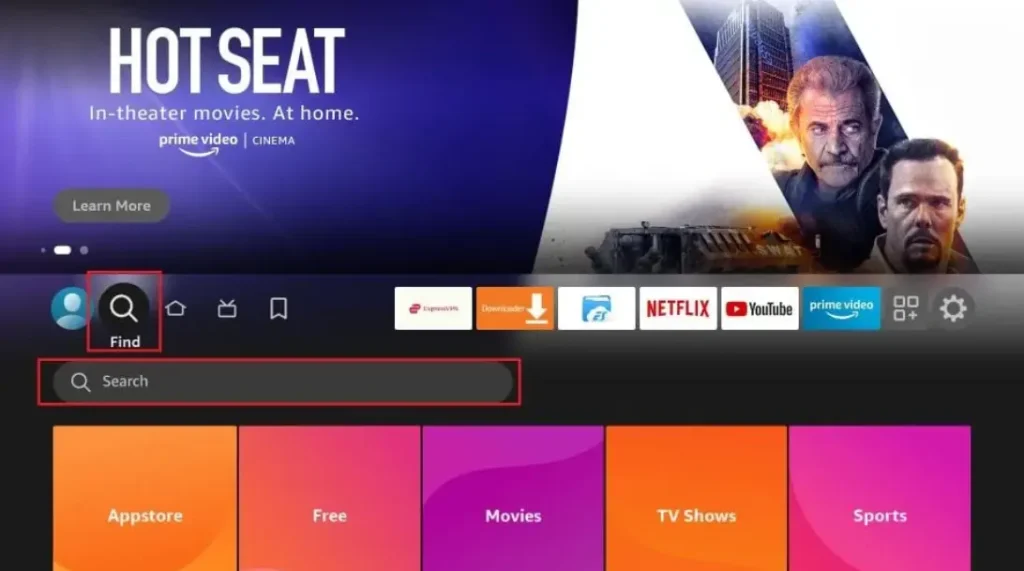
- Click the search icon (magnifying glass) at the top
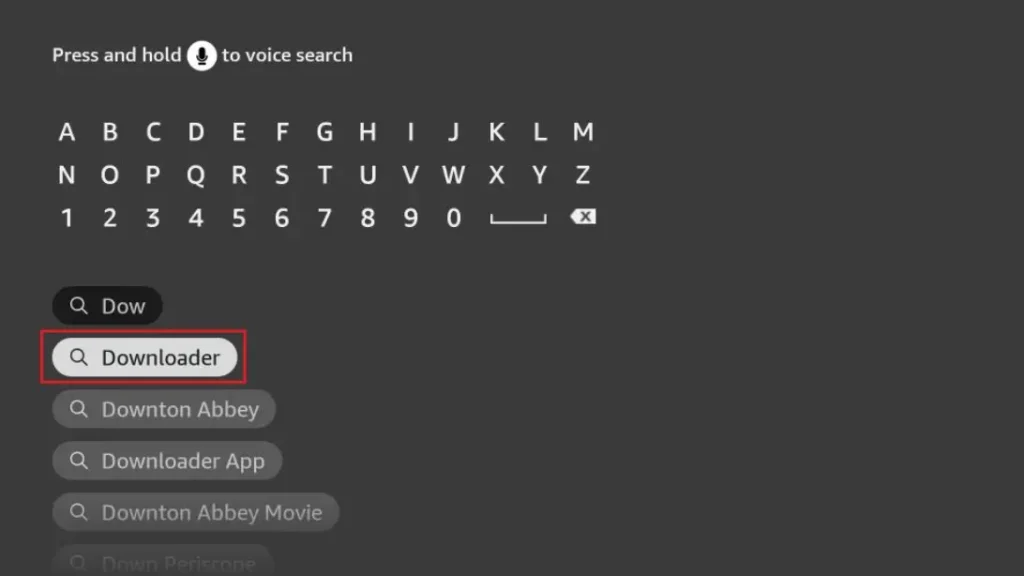
- Type “Downloader” and select the orange app icon
- Click “Download” and wait for installation
- Open the app when it’s ready
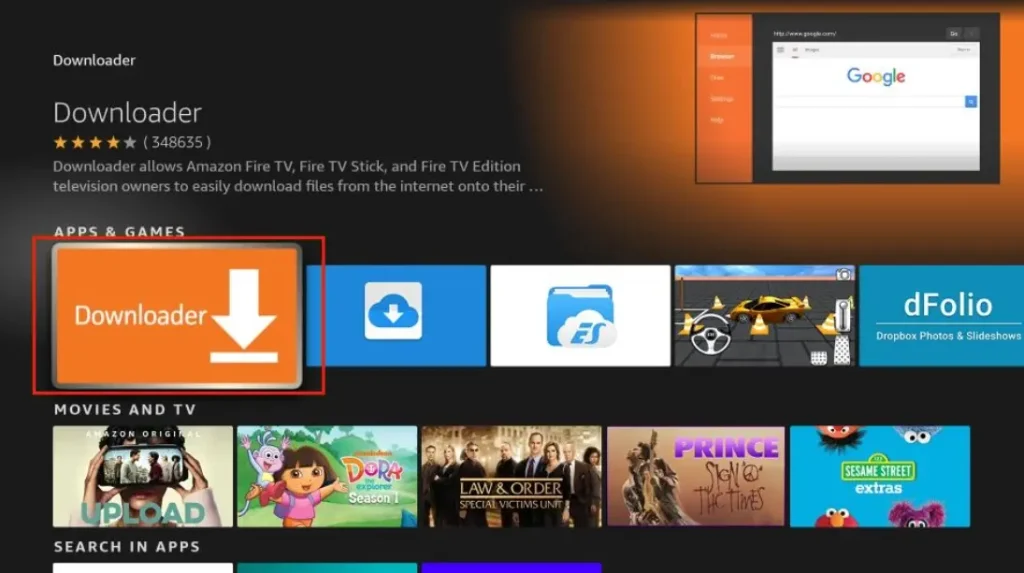
The Downloader app is free and safe. It’s the first tool you need to jailbreak Firestick. Without it, you can’t get the other apps that make jailbreaking work.
Step 2: Enter URL to Download Jailbreak Tool
Now that you have Downloader, you can get the jailbreak tools:
- Open Downloader app
- In the URL box, type: troypoint.com/fire (this is safe)
- Click “Go” and wait for the page to load
- Follow the on-screen instructions to download
- The installer will appear – click “Install”
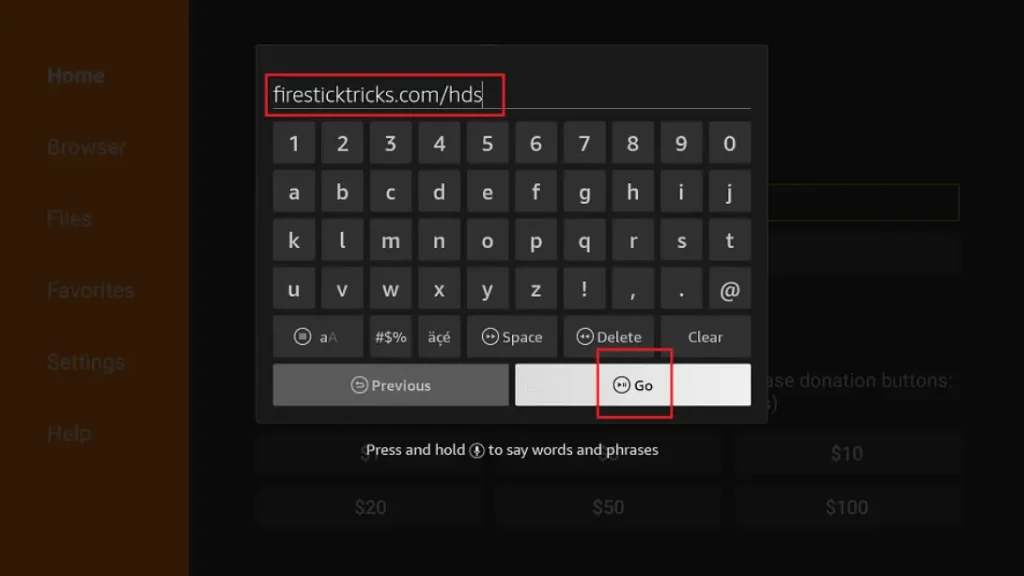
This tool helps you jailbreak Fire Firestick? Learn how to safely jailbreak your Firestick in 2024 with our step-by-step guide. Unlock unlimited streaming & apps! ✅
Frequently Asked Questions (FAQ) – Jailbreaking a Firestick
What does “jailbreaking a Firestick” mean?
Jailbreaking a Firestick refers to the process of modifying the device to install third-party apps, streaming services, or custom software that are not available on the official Amazon App Store. This allows users to access free movies, TV shows, live TV, and other content not typically available through standard Amazon services.
Is jailbreaking a Firestick legal?
Jailbreaking itself is not illegal, but using it to access copyrighted content without proper authorization (such as pirated movies or TV shows) is against the law in many countries. Always ensure you are using legal streaming services and apps.
Will jailbreaking void my Firestick warranty?
Yes, modifying your Firestick by jailbreaking it can void Amazon’s warranty. If your device malfunctions, Amazon may refuse to repair or replace it.
Do I need a VPN for a jailbroken Firestick?
A VPN (Virtual Private Network) is highly recommended when using a jailbroken Firestick to:
Protect your privacy
Bypass geo-restrictions
Avoid ISP throttling
Stay secure when using third-party apps
What are the best apps to install on a jailbroken Firestick?
Some popular apps include:
Kodi (with add-ons like The Crew, Seren, or Exodus)
Cinema HD
Stremio
TiviMate (for IPTV)
SmartTube Next (ad-free YouTube)
Can Amazon block or brick my Firestick if I jailbreak it?
Amazon can disable certain features or push updates that break jailbroken apps, but they typically do not “brick” (completely disable) the device. However, using unauthorized software may lead to account restrictions.
How do I jailbreak my Firestick?
Jailbreaking a Firestick usually involves enabling “Unknown Sources” and sideloading apps via Downloader or ADB. Here’s a basic guide:
Go to Settings > My Fire TV > Developer Options.
Enable “Apps from Unknown Sources” and “ADB Debugging.”
Install Downloader from the Amazon App Store.
Use Downloader to install third-party apps (e.g., Kodi, APK files).
Is jailbreaking the same as rooting?
No. Jailbreaking allows sideloading apps, while rooting gives full system control (like on Android phones). Rooting a Firestick is more complex and risky.
Can I revert my Firestick to its original state?
Yes, you can:
Uninstall unauthorized apps
Reset to factory settings (Settings > My Fire TV > Reset to Factory Defaults)
What are the risks of jailbreaking a Firestick?
Security risks (malware, hacking)
Legal issues (if used for piracy)
Device instability (some apps may crash or slow down the Firestick)
Do I need a jailbroken Firestick to watch free content?
Not necessarily. Many legal free streaming apps (like Pluto TV, Tubi, Crackle) are available without jailbreaking. Jailbreaking is mainly for accessing unofficial sources.
Will jailbreaking make my Firestick faster?
No, it may slow it down if too many apps are installed. Clearing cache and optimizing storage can help maintain performance.
Credit Website: www.gov.uk
Related Post:
- Unlock Endless Entertainment: A Complete Guide to Jailbreaking Sky Glass on Your Firestick in the UK
- Unlock Your Firestick: The Truth About Sky Glass Jailbreak APKs for UK Viewers
- Jailbreak Sky Glass on Firestick: The Ultimate UK Guide to Unlocking Your TV in 2025
- Sky Glass Jailbreak Firestick APK Latest Version: A UK User’s 2025 Guide to Safe & Informed Streaming
- Jailbreak Sky Glass on Firestick Free Download: The Ultimate 2024 Guide for UK Streamers